By Amal Chaudhuri, Chief Technology Officer, Behavioral Signals
Your voice agent works on your laptop, in staging and on the pilot customer’s guest Wi-Fi. Then it goes onto a managed desktop inside a bank, an insurer or a contact center, and the stream never connects. Plain HTTPS to the same host loads fine. Nothing in the logs says why.
Nobody publishes a reliable count of how many large enterprises block WebSocket. What is published is a long trail of developers, framework authors and vendors describing the same failure, and vendor documentation that explains why it happens. This post collects those accounts, maps the network path that causes them, and ends with what to plan for if you sell real-time voice software into enterprises.
What developers and vendors report
An engineering team drove to a customer’s office to debug it. Posten Bring’s developers traced failing connections to a proxy that decrypted all outgoing traffic. After the WebSocket handshake, “when the client sent a packet to the proxy, it immediately received a TCP RST.” Their summary: “if you have customers with ‘very secure’ corporate networks, you need to be very careful about relying on websockets to work,” and “If you care about users on secure corporate networks, you must provide an alternative to websockets for them.” (Bring Developer blog)
A bank simply said no. On the Elixir Forum, a developer explained why a fallback never got working on a banking project: “they felt that they could not secure web sockets in a satisfying manner. So any websocket was blocked by their corporate proxy and nothing to be done.” They rebuilt the feature on plain REST, adding that “when you’re start involving corporate IT in a bank, time starts counting in months.” (Elixir Forum, 2019)
Inspection appliances kill the upgrade outright. A Hacker News commenter who ran a WebSocket product described “filtering MITM application firewall solutions which installed a new trusted root CA on employee machines.” These “would usually be configured to wholesale kill the connection when they saw an UPGRADE because the filtering solutions couldn’t understand the traffic format and they were considered a security risk.” They also learned that running WebSocket on another port “was not a good idea as many organizations only allowed 443.” (Hacker News, 2021)
It shows up in support tickets, not tests. Another commenter wrote: “At $DAYJOB some 5-10% of customers will fail to initiate a websocket connection, even over wss:// despite plain HTTPS requests working fine.” That is one company’s experience, not an industry figure. (Hacker News, 2025)
Real-time transcription is a named casualty. GeekBye, which makes an AI interview assistant, wrote in July 2026: “There is a specific, maddening way for real-time transcription to fail on a corporate network.” The cause: “To the proxy, a WebSocket looks like an unmonitored tunnel out of the network, so it kills it.” (GeekBye blog)
Framework authors build around it. Socket.IO starts every connection on HTTP long-polling because “experience has shown that it is not always possible to establish a WebSocket connection, due to corporate proxies, personal firewall, antivirus software.” (Socket.IO docs) The Phoenix framework now falls back to long-polling automatically “in order to avoid issues with network conditions not allowing WebSockets.” (Phoenix pull request #6057) Real-time platform Ably notes that systems in “government institutions, schools, hospitals, call centers, or other enterprises might not be the most amenable to a Websocket connection by default.” (Ably blog, 2023)
Vendor help centers write it down. Esper’s support article says Zscaler “inspects and filters all outbound traffic, including the WebSocket and WebRTC connections that Esper Remote Viewer relies on,” and blocks them when endpoints “are not explicitly permitted.” (Esper Help) Beaver calls a blocking proxy or firewall “by far the most common cause of ‘Connection Failed’ reports” and asks IT teams to exempt its API from TLS inspection. (Beaver docs)
Why it’s hard: the path one connection takes
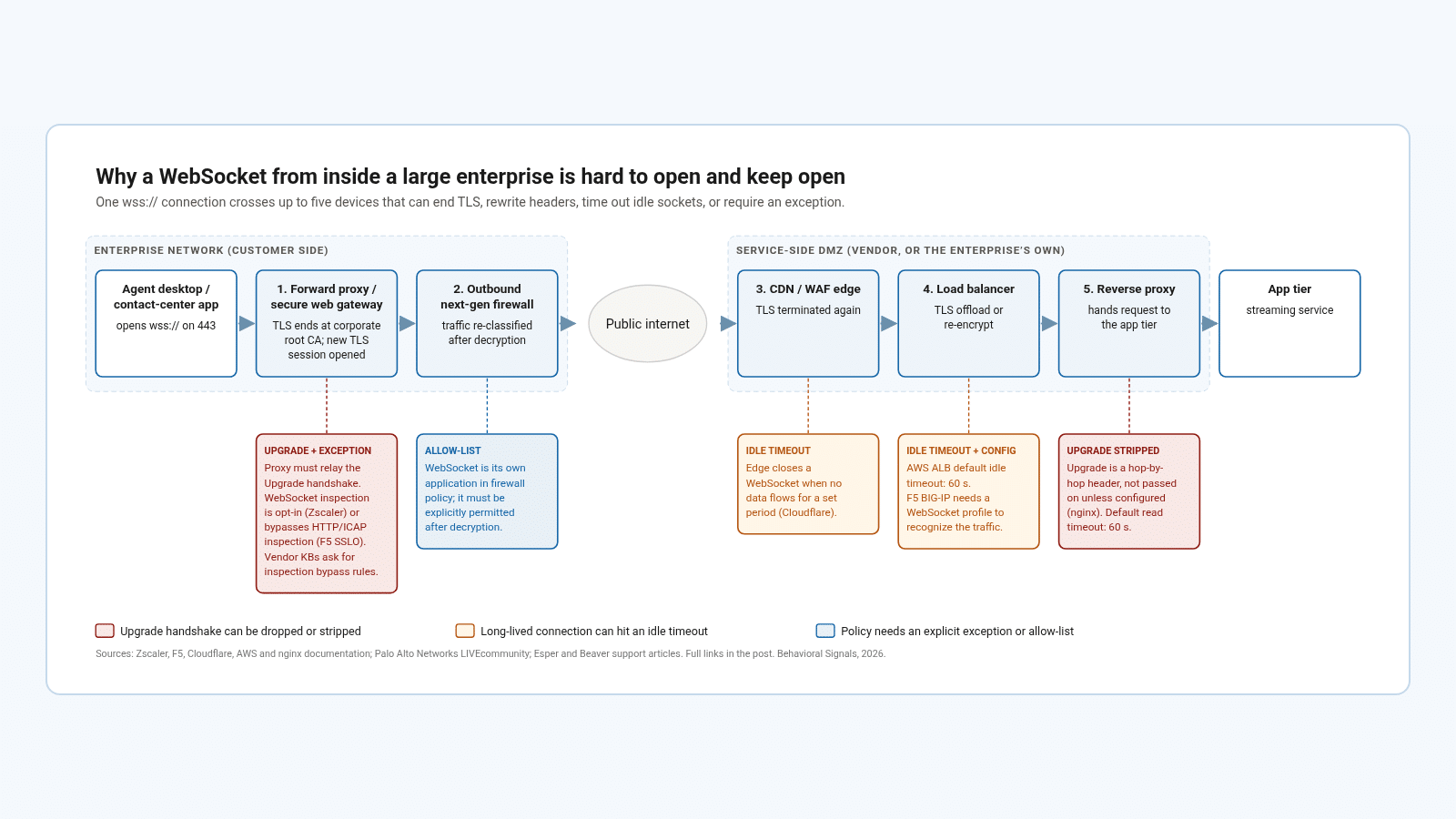
One wss:// connection from inside a large enterprise can cross five devices that end TLS, rewrite headers, time out idle sockets or require an exception. Each callout is based on the vendor documentation cited below.
1. The forward proxy decrypts everything. TLS inspection works by installing the company’s root certificate on every managed device; Zscaler’s deployment guide says to make sure “the Zscaler root certificate is distributed to all users.” (Zscaler) Inspecting what flows inside a WebSocket is a separate capability. Zscaler’s documentation says it “inspects bidirectional WebSocket traffic carrying supported text-based content” and to “contact Zscaler Support to enable this feature.” (Zscaler) F5’s SSL Orchestrator “does not send websocket traffic through HTTP or ICAP security services.” (F5 K23054343) A security team that requires data-loss inspection on all outbound traffic has a clear reason to say no.
2. The firewall sees a different application. On Palo Alto Networks firewalls, websocket is its own App-ID. In the vendor’s community forum, an engineer lists the choices as allowing it explicitly or letting it “hit a default deny rule and hope for the best.” (Palo Alto Networks LIVEcommunity)
3. The edge times out quiet connections. Cloudflare “will close a WebSocket connection when no data is transmitted in either direction for a period of time.” (Cloudflare docs)
4. The load balancer needs its own settings. AWS sets the Application Load Balancer idle timeout to 60 seconds by default. (AWS docs) On F5 BIG-IP, “if you want the BIG-IP system to recognize WebSocket traffic, you need a WebSocket profile.” (F5 techdocs)
5. The reverse proxy drops the Upgrade header by default. nginx’s documentation explains that “since the ‘Upgrade’ is a hop-by-hop header, it is not passed from a client to proxied server” unless configured, and that a connection closes after 60 seconds without data by default. (nginx docs)
Each of these boxes usually belongs to a different team: end-user security, network, the CDN owner, platform engineering. Getting a WebSocket through means a change request at each one.
“My personal experience is that getting a WebSocket connection passed is close to impossible.”
— Amal Chaudhuri, long-term Fortune 10 chief information officer
What about gRPC?
gRPC runs over HTTP/2 rather than upgrading an HTTP/1.1 connection, so it avoids the Upgrade header problem. It is not immune to inspection. Spectro Cloud documents that “Squid does not support HTTP/2 for intercepted (SSL-bumped) HTTPS traffic, so gRPC fails when Squid performs an SSL bump.” (Spectro Cloud docs) M-Files warns that “SSL Inspection” features “can break the gRPC traffic” for its vaults. (M-Files) The point is not that one transport always passes. Every long-lived streaming connection needs a plan for enterprise networks.
Questions to ask before you choose a real-time API
Many voice and emotion APIs offer streaming only over WebSocket. That works well for a product designed around a developer’s laptop or a startup’s own cloud: one URL, a quick demo, results in seconds. An enterprise network is a different environment. Once the integration goes through a bank’s or an insurer’s network review, every hop in the diagram above gets a say, and a demo that took an afternoon can sit in procurement for months. Before you commit to a vendor for an enterprise deployment, ask:
- Which transports does your streaming API support?
- Does it work through a TLS-inspecting proxy, and what goes on the allow-list?
- What’s the fallback if the Upgrade handshake is blocked?
- Who has deployed it inside a regulated enterprise’s own network?
Behavioral Signals streams over gRPC on port 443, as described in our streaming documentation, so there’s no Upgrade handshake to strip.
How to plan for it
- Test from the customer’s network in week one. Run a WebSocket or gRPC test from a managed desktop on their network before the pilot starts, next to a plain HTTPS request to the same host. If HTTPS works and the stream fails, you have something specific to take to IT.
- Use TLS on port 443 only. Other ports are often closed, and unencrypted connections are more likely to be altered in transit.
- Send a heartbeat more often than the shortest idle timeout. With 60-second defaults common at load balancers and proxies, a ping every 20 to 30 seconds keeps quiet calls open.
- Classify failures correctly. GeekBye found its fallback would never trigger because a proxy’s HTTP 403 was being treated as a login error. Treat a 403 or 407 on the handshake as a blocked transport.
- Have a fallback. Long-polling or server-sent events plus HTTPS uploads keep features working. For analytics that don’t need an answer during the call, send recordings to a batch API after the call ends.
- Ask for the allow-list early, in writing. Give the customer one page with hostnames, port, protocol and a request to exempt them from TLS inspection. Esper’s and Beaver’s help articles are good models.
Where Behavioral Signals fits
Behavioral Signals reads emotion and behavior from voice. Our streaming API runs over gRPC on a single endpoint, streaming.behavioralsignals.com:443, as described in the streaming documentation. For recorded calls, the batch API takes audio files, and ASR and speaker diarization are included in batch processing. If a customer’s network can’t carry a live stream yet, batch processing keeps the analysis running while the allow-list request works its way through.
Try it with 30 free minutes: create an account, then follow the documentation.