01 / Emotion detection for Pipecat
Your Pipecat voice agent can now hear how users sound, not just what they say.
pipecat-behavioralsignals is an open-source perception producer for Pipecat. Before most user turns reach your agent’s LLM, it adds a reading of the voice: emotion, strength, positivity, speaking rate, hesitation, engagement and intensity.
One install. One line in your pipeline, right after speech-to-text. Get your key from the portal yourself, with no sales call.
$ uv add pipecat-behavioralsignals- Open source, BSD 2-Clause
- Maintained by Behavioral Signals
- Python 3.12+ · Pipecat 1.16
02 / Pipecat perception
One station between hearing and thinking
Pipecat already hears the user, transcribes them, thinks and speaks. Behavioral Signals adds a perception step right after speech-to-text, so the LLM gets how each turn sounded along with what was said. The package is a perception producer for Pipecat’s Real-Time Context Standard (RCS) and expressive conversation.
- HearYour transport takes in the user’s audio.
- TranscribeYour STT service turns it into words and passes the audio on.
- Behavioral SignalsPerceptionBehavioral Signals reads the voice and adds the reading to the turn.
- ThinkYour LLM reads the reading with the user’s words.
- SpeakYour TTS answers.
03 / Most user turns
Pipecat emotion detection, plus six more voice signals
Most user messages reach the LLM with a reading in front of it. Every label carries a probability, from likeliest to least likely, so your prompt or your rules decide how much weight to give it.
([voice_emotion angry=0.71, neutral=0.20, sad=0.06, happy=0.03],[positivity negative=0.72, neutral=0.20, positive=0.08],[strength strong=0.64, neutral=0.30, weak=0.06],[speaking_rate fast=0.50, normal=0.40, slow=0.10],[hesitation no=0.80, yes=0.20],[engagement engaged=0.55, neutral=0.35, withdrawn=0.10],[intensity value=0.61]) I already told you, I was charged twice.| Signal | What it reads | Labels |
|---|---|---|
voice_emotion | The emotion in the voice | happy, angry, sad, neutral |
strength | The energy in the voice | strong, weak, neutral |
positivity | How positive the tone of voice is | positive, negative, neutral |
speaking_rate | How fast the user speaks, compared to speakers in general | fast, slow, normal |
hesitation | Whether the user sounds hesitant | yes, no |
engagement | Whether the user sounds involved or detached | engaged, withdrawn, neutral |
intensity | How intense the emotion is, whichever emotion it is | a value from 0 to 1 |
A reading covers a recent part of the turn, often not its last words, and a very short turn may have none. Outputs are probabilistic estimates of signals expressed in speech, not determinations of what a person feels, intends or believes.
04 / Setup
One install, one line after speech-to-text
Install
$ uv add pipecat-behavioralsignalsOr
pip install pipecat-behavioralsignals.Add your key
Create an account and an API key in the Behavioral Signals portal, then set them:
export BEHAVIORALSIGNALS_CID=...
export BEHAVIORALSIGNALS_API_KEY=...
Add the line after STT
Then turn on expressive conversation.
from pipecat_behavioralsignals import BehavioralSignalsPerceptionService

pipeline = Pipeline([
    transport.input(),
    stt,
    BehavioralSignalsPerceptionService(),  # right after STT
    user_aggregator,
    llm,
    tts,
    transport.output(),
    assistant_aggregator,
])

worker = PipelineWorker(pipeline, params=PipelineParams(enable_expressive_conversation=True))
Keep your STT service’s default audio passthrough on, so the service hears the audio. Without enable_expressive_conversation=True, the LLM doesn’t see the readings. It runs alongside Pipecat’s own readers, such as Pipecat Tone, which reads the words: it adds its reading to the one a turn already carries.
05 / In the catalog
Listed in Pipecat’s Supported Services catalog
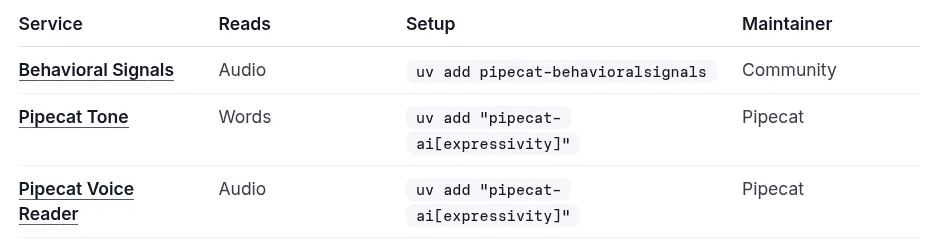
Behavioral Signals sits in the Perception table of Pipecat’s Supported Services catalog, with the one-line install. Pipecat lists it as a community-maintained integration, built and maintained by Behavioral Signals.
06 / Use cases
What a voice agent does with how users sound
Support agents
When the voice sounds angry and positivity turns negative, shorten replies, apologize or offer a human. De-escalate before the customer asks.
Sales agents
When hesitation shows up before a “yes”, confirm before you act. When the user speaks fast, get to the answer sooner.
Health agents
When engagement turns withdrawn over several turns, check in or slow down. Your agent notices how a patient sounds, not just what they say.
07 / Languages
Reads the voice, not the words
The models are paralinguistic. They read how something is said, not the words, so they aren’t tied to one language. They work best in the 11 languages they’re trained on.
- English
- Arabic
- Russian
- Chinese
- French
- German
- Spanish
- Portuguese
- Japanese
- Hindi
- Tamil
08 / More from the API
The full API also returns more
Behavioral Signals API outputs. These come from the API, not from the Pipecat package.
Transcript and speaker
ASR and speaker diarization, at no extra charge.
Stress and confidence
Also available: stress and confidence signals, built with Focus and added to your API output on request.
Questions developers ask
What is pipecat-behavioralsignals?
An open-source Python package that adds emotion detection to Pipecat voice agents. It sends the user’s audio to the Behavioral Signals API and adds a reading of how each turn sounded to what the LLM sees.
Is it a Pipecat perception producer?
Yes. It’s a perception producer for Pipecat’s expressive conversation, and it’s listed under Perception in Pipecat’s Supported Services catalog.
How do I add it to my pipeline?
Run uv add pipecat-behavioralsignals, set your client ID and API key from the portal, put BehavioralSignalsPerceptionService() right after your STT service, and turn on enable_expressive_conversation.
Do I have to change my STT, LLM or TTS?
No. You keep them. The service adds its readings to the user’s transcriptions, and the rest of your pipeline stays as it is. Keep your STT service’s default audio passthrough on.
What does the LLM get each turn?
A reading in front of the user’s words: voice emotion, strength, positivity, speaking rate, hesitation, engagement and intensity, each label with its probability.
Does it work with Pipecat Tone?
Yes. Pipecat Tone reads the words. This service reads the voice and adds its reading to the one a turn already carries.
Which Pipecat and Python versions does it need?
Version 0.2.0 needs Pipecat 1.16 and Python 3.12 or later. On Pipecat 1.15, use 0.1.0.
Which languages does it work in?
The models read how something is said, not the words, so they aren’t tied to one language. They work best in the 11 they’re trained on: English, Arabic, Russian, Chinese, French, German, Spanish, Portuguese, Japanese, Hindi and Tamil.
How do I start for free?
Sign up on the portal. New accounts start with 30 free minutes, with no credit card needed.
Does it return stress and confidence?
No, the package doesn’t. Those are Behavioral Signals API outputs, not package outputs. Also available: stress and confidence signals, built with Focus and added to your API output on request.
What happens to my users’ audio?
The service sends the user’s audio to the Behavioral Signals API, which saves a stream’s results so they can be fetched later. Tell your users, and check that this fits your privacy terms.
Does a reading tell me what the user feels?
No. Outputs are probabilistic estimates of signals expressed in speech, not determinations of what a person feels, intends or believes.
Who maintains it?
Behavioral Signals builds and maintains it. Pipecat lists it as a community-maintained integration. Report issues on GitHub.
11 / Start
Give your agent the voice reading
Get a key from the portal, add one line after speech-to-text, and hear how your users sound.
The missing link: bringing EQ to AI IQ.